Configure liveness, readiness and startup probes to monitor your application health
Health checks are automated procedures that monitor application status, determining readiness for traffic or restart needs. Qovery leverages Kubernetes probes for continuous verification during deployment and runtime phases.
Kubernetes Probe Types
Qovery utilizes three probe mechanisms:
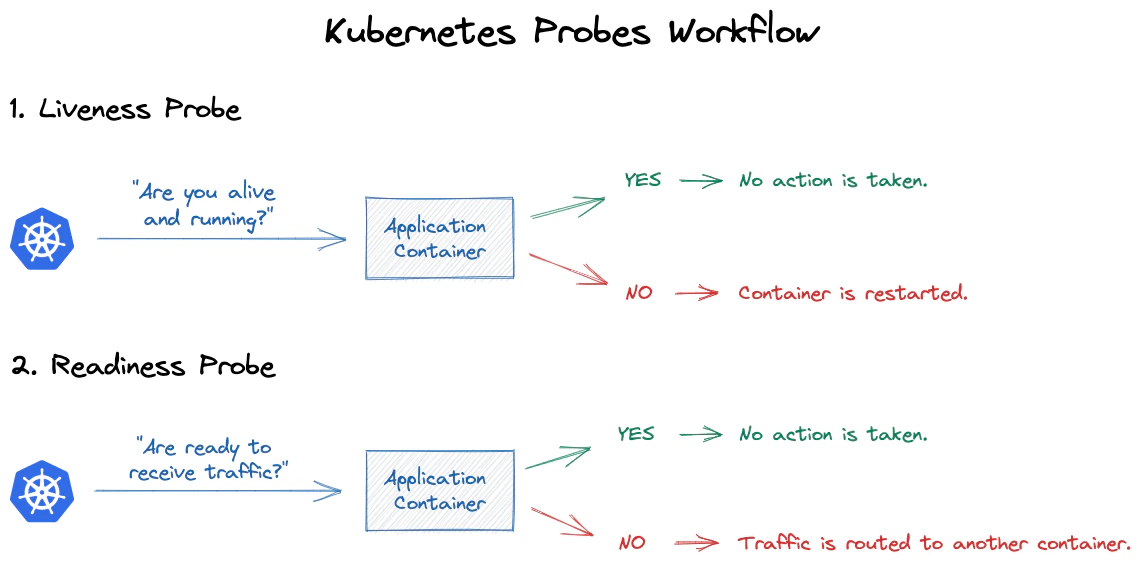
Liveness probe: Verifies container vitality. Failed checks trigger container restarts, addressing issues like deadlocks where applications run but cannot progress.
Readiness probe: Confirms container readiness for incoming requests. Traffic routes only to ready pods; unready containers are removed from load balancers.
Startup probe (optional): Verifies that the container has started. Kubernetes runs the liveness and readiness probes only once it succeeds, so a slow start does not trip the liveness probe. If the startup probe keeps failing past its failure threshold, the container is restarted.
During deployment, the configured probes must succeed for the deployment to complete.In the Console, the health check settings show a Startup column next to Liveness and Readiness. It is off (type NONE) unless you set it. Through the API, it is healthchecks.startup_probe, available on applications, containers and jobs. Leaving it out, or setting it to null, means no startup probe, and an edit that leaves it out removes it.
Probes Configuration Parameters
Type
Configure probe execution method:
NONE: Disables the probe (not recommended for liveness probes)
HTTP probes: Ping specified path/port; success requires 200-300 range responses
TCP probes: Establish port connections; successful connections indicate health
gRPC probes: Connect to specified port/service; successful connections confirm health
EXEC probes: Execute container commands; failed execution = probe failure. Enter a plain command or a JSON array format.
EXEC Probe Command Format
You can specify the command in two ways:Plain command string (recommended for shell commands):
test -f /tmp/healthy
This is automatically converted to ["sh", "-c", "<your command>"].JSON array format (for explicit argument control):
Use the plain command format for complex shell commands with quotes or pipes. The JSON array format is useful when you need precise control over command arguments.
Initial Delay (in seconds)
Specifies interval between container start and first liveness check. Useful for applications requiring extended boot time.
Period (in seconds)
Sets interval between consecutive probe executions.
Timeout (in seconds)
Defines maximum wait time for probe response.
Success Threshold
Minimum consecutive successes required after previous failures (limited to 1 by Kubernetes).
Failure Threshold
Minimum consecutive failures required to mark probe as failed after successes.
Long-Starting Applications
Applications with extended boot operations may fail deployment if probes cannot verify status within timeframes. Look for warnings:
Add a startup probe for an application that takes long to boot. Its initial delay plus its failure threshold times its period is roughly the time the application gets to start (with the Console defaults, 10 seconds plus 30 failures every 10 seconds, about 5 minutes), and the liveness probe only starts once it succeeds. You can also increase Initial Delay to match your boot duration.