> ## Documentation Index
> Fetch the complete documentation index at: https://www.qovery.com/docs/llms.txt
> Use this file to discover all available pages before exploring further.
# Members & RBAC
> Manage organization members and role-based access control
## Organization Members
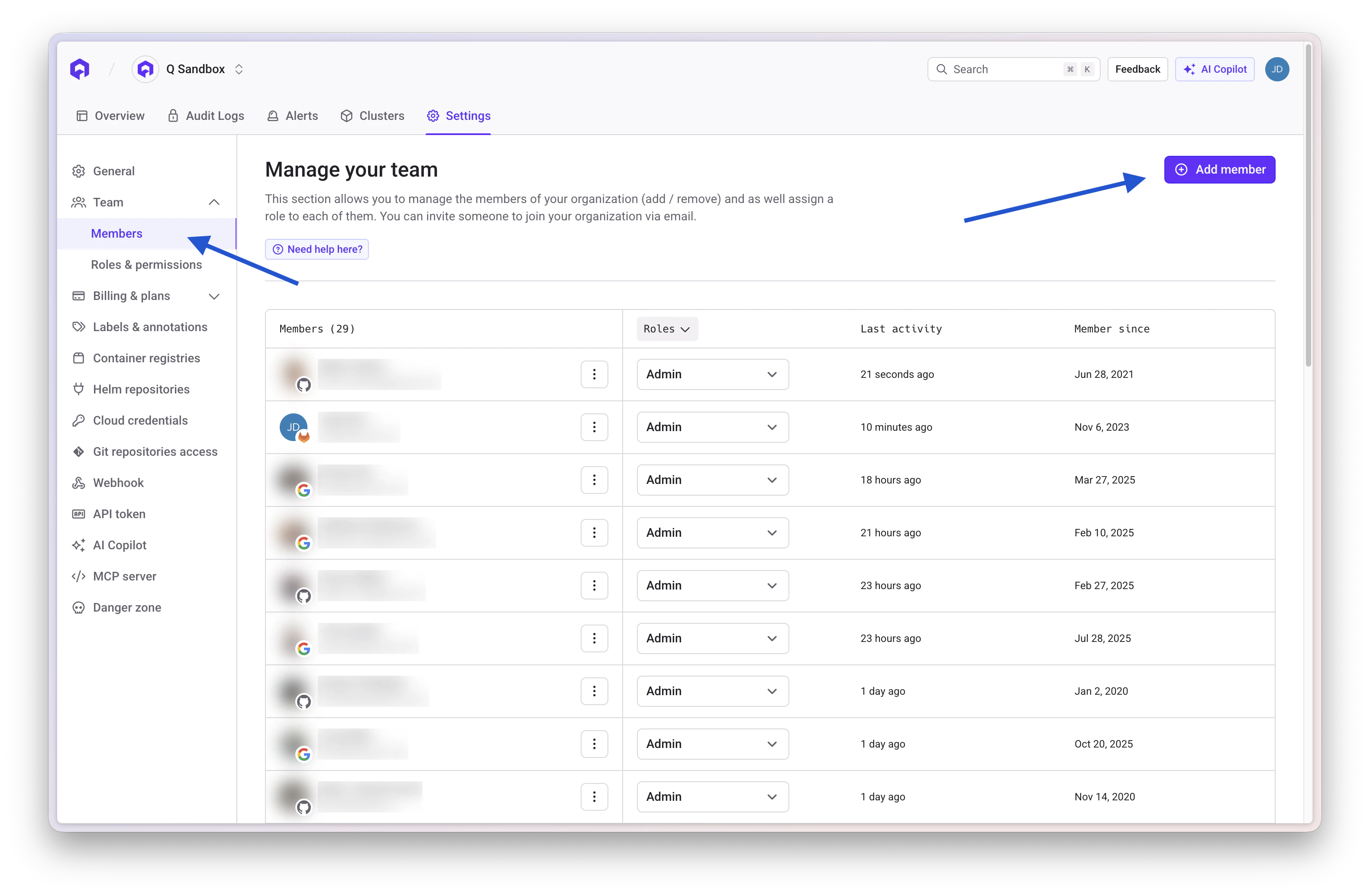
You can invite someone to join your organization by email. Once they accept the invitation, they will have access to the organization and all its projects based on their assigned role.
### Accessing Members Settings
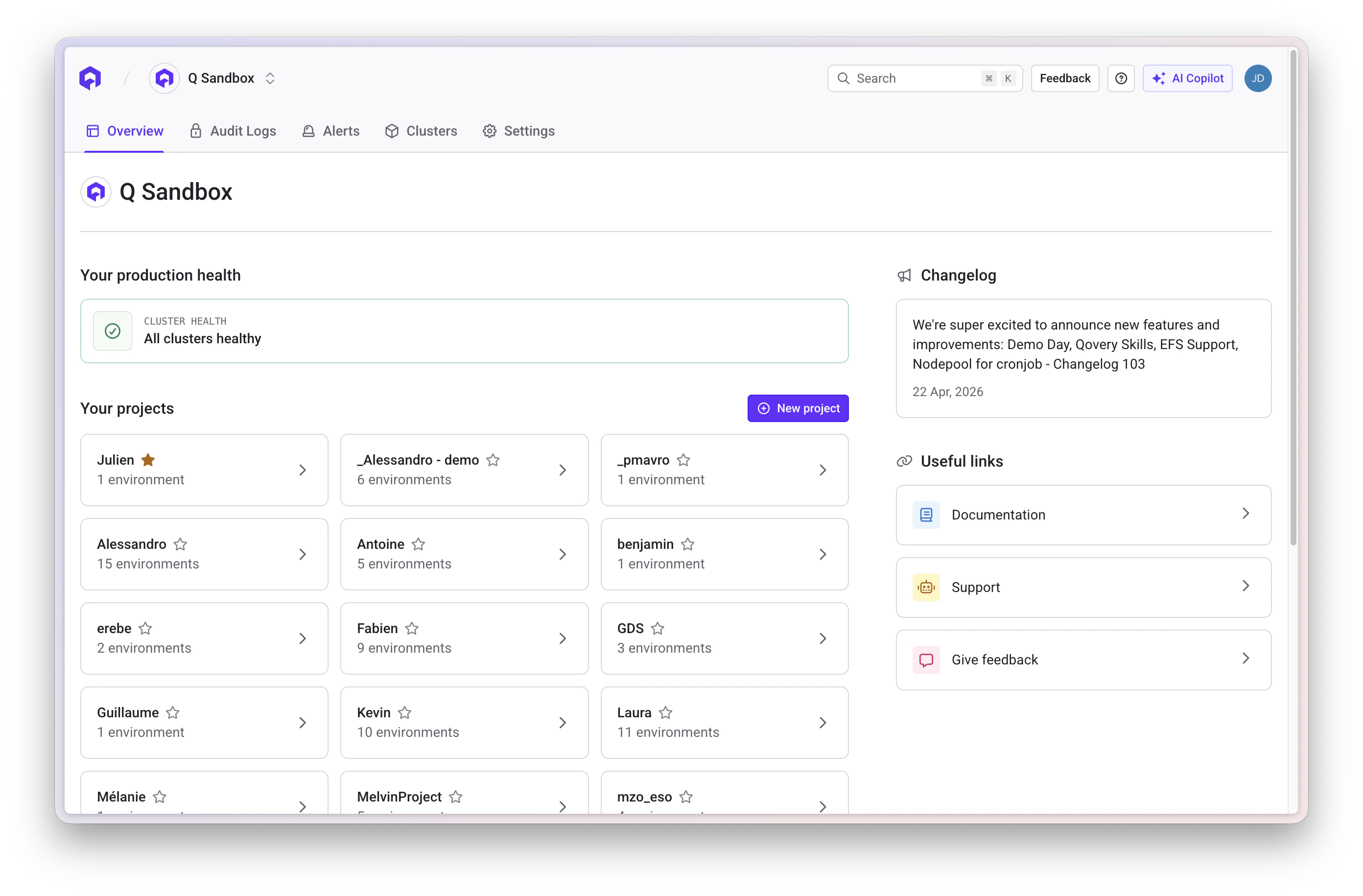
Click the Settings tab while you are on your organization overview.
 Open the **Members** section within the organization settings
 ### Inviting Members
1. Click the **Invite Member** button
2. Enter the member's email address
3. Select a role (see Default Roles below)
4. Click **Send Invitation**
The invited member will receive an email with instructions to join the organization.
Each user can only hold **one** role at a time. Changing the role of a member requires the user to logout/login to make the changes effective or wait a few minutes (max 1 hour).
## Default Roles
Qovery provides 5 built-in roles with predefined permissions that apply across the entire organization.
### Owner
Full access to the organization. Only one user can be the owner, and ownership can be transferred (see below).
### Admin
Same as Owner except cannot delete the organization or transfer ownership.
### DevOps
Can manage organization infrastructure (clusters, registries, webhooks, API tokens) and has full access to all projects and environments across the organization. Cannot manage members, roles, or billing.
### Billing Manager
Can manage billing only. Has read-only access to cluster information but no access to any project.
### Viewer
Read-only access to all organization resources, clusters, and projects.
## Default Roles - Permissions Matrix
| Action | Owner | Admin | DevOps | Billing Manager | Viewer |
| ----------------------------------------------------------- | :---: | :---: | :----: | :-------------: | :----: |
| Read organization data (registries, clusters, label groups) | yes | yes | yes | yes | yes |
| Edit organization settings | yes | yes | no | no | no |
| Delete organization | yes | no | no | no | no |
| Transfer ownership | yes | no | no | no | no |
| Manage billing | yes | yes | no | yes | no |
| Manage members & roles | yes | yes | no | no | no |
| Manage clusters & container registries | yes | yes | yes | no | no |
| Manage organization setup (API tokens, webhooks, SSO) | yes | yes | yes | no | no |
| Create project | yes | yes | yes | no | no |
| Read any project & environment | yes | yes | yes | no | yes |
| Deploy, manage, and configure any environment | yes | yes | yes | no | no |
| Read cluster info | yes | yes | yes | yes | yes |
## Custom Roles
Custom roles let you grant access scoped to specific projects and clusters, instead of applying permissions across the entire organization. This is useful when you want to give a user access to only certain projects or restrict what they can do within a project.
### Scope and limitations
Custom roles are configured through **cluster-level** and **project-level** permissions only. They always inherit the ability to read organization data (registries, clusters, label groups).
**Custom roles cannot:**
* Generate API tokens
* Manage organization settings (webhooks, SSO)
* Manage members & roles
* Manage billing
If a user with a custom role needs to generate an API token (e.g. for the CLI or Terraform provider), an org admin or DevOps user must generate it for them.
### Cluster Level Permissions
Set per cluster, or applied to all clusters at once:
| Level | What it allows |
| ---------------------- | --------------------------------------------------------------------------------------------------------- |
| **Read-Only** | View cluster information (name, region, status). |
| **Create Environment** | Create and manage environments on this cluster. Cluster settings (nodes, instance type) remain read-only. |
| **Full Access** | Everything in Create Environment, plus manage cluster settings (start/stop, node scaling, configuration). |
### Project Level Permissions
Set per project, independently for each environment type (Development, Preview, Staging, Production):
| Level | What it allows |
| --------------- | ------------------------------------------------------------------------------------------------------------------------------------------------------ |
| **No Access** | No visibility or interaction with this environment type. |
| **Read-Only** | View environments, services, logs, and variables. No write access. |
| **Deploy** | Everything in Read-Only, plus trigger deployments, stop services, and connect via shell. Cannot modify service configuration or environment variables. |
| **Manage** | Everything in Deploy, plus edit service configuration, manage environment variables and secrets, and create or delete services. |
| **Full Access** | Everything in Manage, plus delete environments and manage project-level settings. |
### Custom roles vs built-in DevOps role
A custom role configured with Full Access on all clusters and Full Access on all projects covers the same day-to-day operations as the DevOps role, but with two differences: it cannot generate API tokens or manage org-level settings, and it can optionally be scoped to specific projects only.
| Capability | DevOps (built-in) | Custom role |
| ---------------------------------------- | :---------------: | :------------------------: |
| Access to all projects & environments | yes | only if explicitly granted |
| Full cluster management | yes | only if explicitly granted |
| Read org data (registries, label groups) | yes | yes |
| Generate API tokens | yes | no |
| Manage org setup (webhooks, SSO) | yes | no |
| Manage members & roles | no | no |
| Manage billing | no | no |
### Example configurations
**Developer - access to a specific project**
A developer who should deploy and configure services in one project but have no visibility into other projects:
| Scope | Level |
| ---------------------------- | --------- |
| Cluster | Read-Only |
| Target project - Development | Manage |
| Target project - Preview | Manage |
| Target project - Staging | Read-Only |
| Target project - Production | No Access |
| Other projects | No Access |
**On-call engineer - deploy to any project, no config changes**
An engineer who needs to trigger deployments and read logs across all projects in an incident, but should not be able to modify service configuration:
| Scope | Level |
| ------------------------------------ | --------- |
| All clusters | Read-Only |
| All projects - all environment types | Deploy |
**Security auditor - read-only across everything**
A user who needs visibility into all environments for audit purposes:
| Scope | Level |
| ------------------------------------ | --------- |
| All clusters | Read-Only |
| All projects - all environment types | Read-Only |
**Infrastructure-as-code operator - manage a specific environment**
A user running Terraform or similar tooling against a single environment (API token must be generated by an admin):
| Scope | Level |
| ------------------------------------------ | ------------------ |
| Cluster hosting the target environment | Create Environment |
| Target project - relevant environment type | Manage |
| Other environment types / projects | No Access |
## Transfer Ownership
You can transfer ownership of the organization to another member. To do so:
1. Navigate to the **Members** section in organization settings
2. Click on the member you want to transfer ownership to
3. Select **Transfer Ownership** from the menu
4. Confirm the transfer
Once ownership is transferred, you will no longer be the owner of the
organization.
### Inviting Members
1. Click the **Invite Member** button
2. Enter the member's email address
3. Select a role (see Default Roles below)
4. Click **Send Invitation**
The invited member will receive an email with instructions to join the organization.
Each user can only hold **one** role at a time. Changing the role of a member requires the user to logout/login to make the changes effective or wait a few minutes (max 1 hour).
## Default Roles
Qovery provides 5 built-in roles with predefined permissions that apply across the entire organization.
### Owner
Full access to the organization. Only one user can be the owner, and ownership can be transferred (see below).
### Admin
Same as Owner except cannot delete the organization or transfer ownership.
### DevOps
Can manage organization infrastructure (clusters, registries, webhooks, API tokens) and has full access to all projects and environments across the organization. Cannot manage members, roles, or billing.
### Billing Manager
Can manage billing only. Has read-only access to cluster information but no access to any project.
### Viewer
Read-only access to all organization resources, clusters, and projects.
## Default Roles - Permissions Matrix
| Action | Owner | Admin | DevOps | Billing Manager | Viewer |
| ----------------------------------------------------------- | :---: | :---: | :----: | :-------------: | :----: |
| Read organization data (registries, clusters, label groups) | yes | yes | yes | yes | yes |
| Edit organization settings | yes | yes | no | no | no |
| Delete organization | yes | no | no | no | no |
| Transfer ownership | yes | no | no | no | no |
| Manage billing | yes | yes | no | yes | no |
| Manage members & roles | yes | yes | no | no | no |
| Manage clusters & container registries | yes | yes | yes | no | no |
| Manage organization setup (API tokens, webhooks, SSO) | yes | yes | yes | no | no |
| Create project | yes | yes | yes | no | no |
| Read any project & environment | yes | yes | yes | no | yes |
| Deploy, manage, and configure any environment | yes | yes | yes | no | no |
| Read cluster info | yes | yes | yes | yes | yes |
## Custom Roles
Custom roles let you grant access scoped to specific projects and clusters, instead of applying permissions across the entire organization. This is useful when you want to give a user access to only certain projects or restrict what they can do within a project.
### Scope and limitations
Custom roles are configured through **cluster-level** and **project-level** permissions only. They always inherit the ability to read organization data (registries, clusters, label groups).
**Custom roles cannot:**
* Generate API tokens
* Manage organization settings (webhooks, SSO)
* Manage members & roles
* Manage billing
If a user with a custom role needs to generate an API token (e.g. for the CLI or Terraform provider), an org admin or DevOps user must generate it for them.
### Cluster Level Permissions
Set per cluster, or applied to all clusters at once:
| Level | What it allows |
| ---------------------- | --------------------------------------------------------------------------------------------------------- |
| **Read-Only** | View cluster information (name, region, status). |
| **Create Environment** | Create and manage environments on this cluster. Cluster settings (nodes, instance type) remain read-only. |
| **Full Access** | Everything in Create Environment, plus manage cluster settings (start/stop, node scaling, configuration). |
### Project Level Permissions
Set per project, independently for each environment type (Development, Preview, Staging, Production):
| Level | What it allows |
| --------------- | ------------------------------------------------------------------------------------------------------------------------------------------------------ |
| **No Access** | No visibility or interaction with this environment type. |
| **Read-Only** | View environments, services, logs, and variables. No write access. |
| **Deploy** | Everything in Read-Only, plus trigger deployments, stop services, and connect via shell. Cannot modify service configuration or environment variables. |
| **Manage** | Everything in Deploy, plus edit service configuration, manage environment variables and secrets, and create or delete services. |
| **Full Access** | Everything in Manage, plus delete environments and manage project-level settings. |
### Custom roles vs built-in DevOps role
A custom role configured with Full Access on all clusters and Full Access on all projects covers the same day-to-day operations as the DevOps role, but with two differences: it cannot generate API tokens or manage org-level settings, and it can optionally be scoped to specific projects only.
| Capability | DevOps (built-in) | Custom role |
| ---------------------------------------- | :---------------: | :------------------------: |
| Access to all projects & environments | yes | only if explicitly granted |
| Full cluster management | yes | only if explicitly granted |
| Read org data (registries, label groups) | yes | yes |
| Generate API tokens | yes | no |
| Manage org setup (webhooks, SSO) | yes | no |
| Manage members & roles | no | no |
| Manage billing | no | no |
### Example configurations
**Developer - access to a specific project**
A developer who should deploy and configure services in one project but have no visibility into other projects:
| Scope | Level |
| ---------------------------- | --------- |
| Cluster | Read-Only |
| Target project - Development | Manage |
| Target project - Preview | Manage |
| Target project - Staging | Read-Only |
| Target project - Production | No Access |
| Other projects | No Access |
**On-call engineer - deploy to any project, no config changes**
An engineer who needs to trigger deployments and read logs across all projects in an incident, but should not be able to modify service configuration:
| Scope | Level |
| ------------------------------------ | --------- |
| All clusters | Read-Only |
| All projects - all environment types | Deploy |
**Security auditor - read-only across everything**
A user who needs visibility into all environments for audit purposes:
| Scope | Level |
| ------------------------------------ | --------- |
| All clusters | Read-Only |
| All projects - all environment types | Read-Only |
**Infrastructure-as-code operator - manage a specific environment**
A user running Terraform or similar tooling against a single environment (API token must be generated by an admin):
| Scope | Level |
| ------------------------------------------ | ------------------ |
| Cluster hosting the target environment | Create Environment |
| Target project - relevant environment type | Manage |
| Other environment types / projects | No Access |
## Transfer Ownership
You can transfer ownership of the organization to another member. To do so:
1. Navigate to the **Members** section in organization settings
2. Click on the member you want to transfer ownership to
3. Select **Transfer Ownership** from the menu
4. Confirm the transfer
Once ownership is transferred, you will no longer be the owner of the
organization.