> ## Documentation Index
> Fetch the complete documentation index at: https://www.qovery.com/docs/llms.txt
> Use this file to discover all available pages before exploring further.
# Overview
> Configure external secrets providers within your Qovery cluster
This feature is available on:
* AWS Managed Cluster
* GCP Managed Cluster
Supported Secrets Providers:
* AWS Secrets Manager
* AWS Parameter Store
* GCP Secret Manager
## Secret Manager Access benefits
Compared to Qovery built-in secrets, integrating a dedicated Secret Manager offers several key advantages:
* **Security and data sovereignty**: Your secrets stay entirely within your own infrastructure and are never transmitted through Qovery's systems.
Secret values are fetched directly by External Secret Operator from your provider into your cluster, minimizing the number of systems that ever handle
raw secret values. With built-in secrets, the value passes through Qovery's API and storage layer.
* **Centralized secret management**: Use your existing secrets provider as a single source of truth across all your infrastructure —
Qovery services, Lambda functions, CI pipelines, and other tools all reference the same secrets without duplication.
A secret defined once can also be consumed by multiple clusters (e.g., staging and production) without recreating it in each environment.
* **Simplified and automatic secret rotation**: When a shared secret needs updating, change it once in your secrets manager, then redeploy
the affected services via Qovery to pick up the new value. You can also leverage native automatic rotation from your provider (e.g., database credentials
rotated via a Lambda function) — Qovery services will benefit from it in the next deployment without any additional secret management step.
* **Audit trails and compliance**: Cloud-native secret managers provide built-in versioning, access logs, and fine-grained IAM policies —
seamlessly extending your existing compliance posture to secrets consumed by Qovery services.
## How it works
Qovery integrates with external secrets by deploying [ESO](https://external-secrets.io/latest/) (External Secrets Operator) in your cluster.
```mermaid theme={null}
graph TB
subgraph SecretsProvider[Your Secrets Provider]
AWS_PS([AWS Parameter Store])
AWS_SM([AWS Secrets Manager])
GCP_SM([GCP Secret Manager])
end
AWS_PS & AWS_SM & GCP_SM ---|Read Upstream Secrets| ESO
subgraph K8s[Your Kubernetes Cluster]
subgraph EngineInfra[Managed at Cluster Level]
ESO[External Secret Operator]
CSS[Cluster Secret Store]
end
subgraph EngineEnv[Managed at Service Level]
ES[External Secret]
S[Secret]
Pod[Pod]
end
ESO -->|Manages| CSS
CSS -->|Monitors External Secrets| ES
ES -->|Produces Kubernetes Secrets| S
Pod -->|Uses Kubernetes Secret| S
end
style EngineInfra fill:transparent,stroke:orange,color:orange
style EngineEnv fill:transparent,stroke:orange,color:orange
style SecretsProvider fill:transparent,stroke:orange,color:orange
```
## Configure a Secret Manager Access
You can configure a Secret Manager Access in the **Add-ons** section of your cluster.
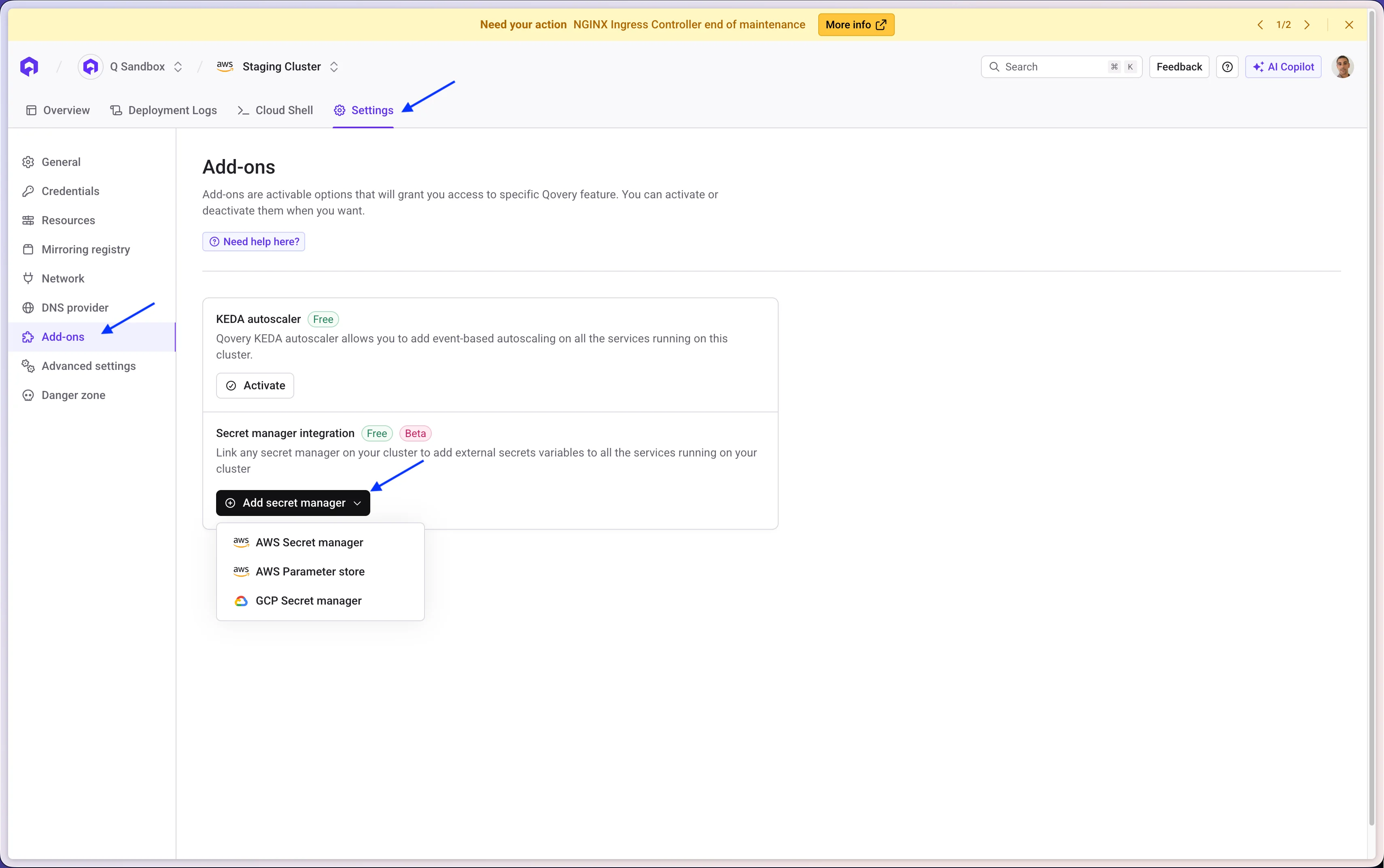 Creating or Editing a Secret Manager Access **requires the cluster to be redeployed**
Select the guide for your secrets provider:
Connect to AWS Secrets Manager from an AWS or GCP cluster
Connect to AWS Parameter Store from an AWS or GCP cluster
Connect to GCP Secret Manager from a GCP or AWS cluster
## Reference the external secrets in your services
**Setting external secrets at the environment level multiplies cloud costs.**
You can set external secrets at the environment level to inject them to all services, but be careful:
* The secret value will be fetched individually for each service running in the environment.
* With many services, this multiplies the number of secret fetches and can significantly increase your cloud costs.
```mermaid theme={null}
graph TB
subgraph UserConfig[Your Configuration]
subgraph Env[Environment]
EnvES([External Secret at environment level])
subgraph Services[Services]
SvcA([service-a])
SvcB([service-b])
SvcC([service-c])
end
end
end
subgraph K8s[Kubernetes Cluster]
ES1[ExternalSecret for service-a]
ES2[ExternalSecret for service-b]
ES3[ExternalSecret for service-c]
Pod1([Pod service-a])
Pod2([Pod service-b])
Pod3([Pod service-c])
SPACER1[ ]
SPACER2[ ]
SPACER3[ ]
end
EnvES --> ES1
EnvES --> ES2
EnvES --> ES3
ES1 --> Pod1
ES2 --> Pod2
ES3 --> Pod3
Pod1 ~~~ SPACER1
Pod2 ~~~ SPACER2
Pod3 ~~~ SPACER3
style UserConfig fill:transparent,stroke:orange,color:orange
style Env fill:transparent,stroke:#a78bfa,color:#a78bfa
style Services fill:transparent,stroke:#a78bfa,color:#a78bfa
style K8s fill:transparent,stroke:#2dd4bf,color:#2dd4bf
style EnvES fill:#f87171,color:#fff,stroke:#f87171
style ES1 fill:#f87171,color:#fff,stroke:#f87171
style ES2 fill:#f87171,color:#fff,stroke:#f87171
style ES3 fill:#f87171,color:#fff,stroke:#f87171
style Pod1 fill:#38bdf8,color:#fff,stroke:#38bdf8
style Pod2 fill:#38bdf8,color:#fff,stroke:#38bdf8
style Pod3 fill:#38bdf8,color:#fff,stroke:#38bdf8
style SPACER1 fill:transparent,stroke:transparent,color:transparent
style SPACER2 fill:transparent,stroke:transparent,color:transparent
style SPACER3 fill:transparent,stroke:transparent,color:transparent
```
Prefer service-level secrets when only a subset of services need access to the value.
### Using the Qovery Console
Once your cluster is deployed, you can link external secrets to any service:
* Open your service
* Navigate to the **Variables** tab
* Select the **External secrets** tab
* Click **Add external secret**
Creating or Editing a Secret Manager Access **requires the cluster to be redeployed**
Select the guide for your secrets provider:
Connect to AWS Secrets Manager from an AWS or GCP cluster
Connect to AWS Parameter Store from an AWS or GCP cluster
Connect to GCP Secret Manager from a GCP or AWS cluster
## Reference the external secrets in your services
**Setting external secrets at the environment level multiplies cloud costs.**
You can set external secrets at the environment level to inject them to all services, but be careful:
* The secret value will be fetched individually for each service running in the environment.
* With many services, this multiplies the number of secret fetches and can significantly increase your cloud costs.
```mermaid theme={null}
graph TB
subgraph UserConfig[Your Configuration]
subgraph Env[Environment]
EnvES([External Secret at environment level])
subgraph Services[Services]
SvcA([service-a])
SvcB([service-b])
SvcC([service-c])
end
end
end
subgraph K8s[Kubernetes Cluster]
ES1[ExternalSecret for service-a]
ES2[ExternalSecret for service-b]
ES3[ExternalSecret for service-c]
Pod1([Pod service-a])
Pod2([Pod service-b])
Pod3([Pod service-c])
SPACER1[ ]
SPACER2[ ]
SPACER3[ ]
end
EnvES --> ES1
EnvES --> ES2
EnvES --> ES3
ES1 --> Pod1
ES2 --> Pod2
ES3 --> Pod3
Pod1 ~~~ SPACER1
Pod2 ~~~ SPACER2
Pod3 ~~~ SPACER3
style UserConfig fill:transparent,stroke:orange,color:orange
style Env fill:transparent,stroke:#a78bfa,color:#a78bfa
style Services fill:transparent,stroke:#a78bfa,color:#a78bfa
style K8s fill:transparent,stroke:#2dd4bf,color:#2dd4bf
style EnvES fill:#f87171,color:#fff,stroke:#f87171
style ES1 fill:#f87171,color:#fff,stroke:#f87171
style ES2 fill:#f87171,color:#fff,stroke:#f87171
style ES3 fill:#f87171,color:#fff,stroke:#f87171
style Pod1 fill:#38bdf8,color:#fff,stroke:#38bdf8
style Pod2 fill:#38bdf8,color:#fff,stroke:#38bdf8
style Pod3 fill:#38bdf8,color:#fff,stroke:#38bdf8
style SPACER1 fill:transparent,stroke:transparent,color:transparent
style SPACER2 fill:transparent,stroke:transparent,color:transparent
style SPACER3 fill:transparent,stroke:transparent,color:transparent
```
Prefer service-level secrets when only a subset of services need access to the value.
### Using the Qovery Console
Once your cluster is deployed, you can link external secrets to any service:
* Open your service
* Navigate to the **Variables** tab
* Select the **External secrets** tab
* Click **Add external secret**
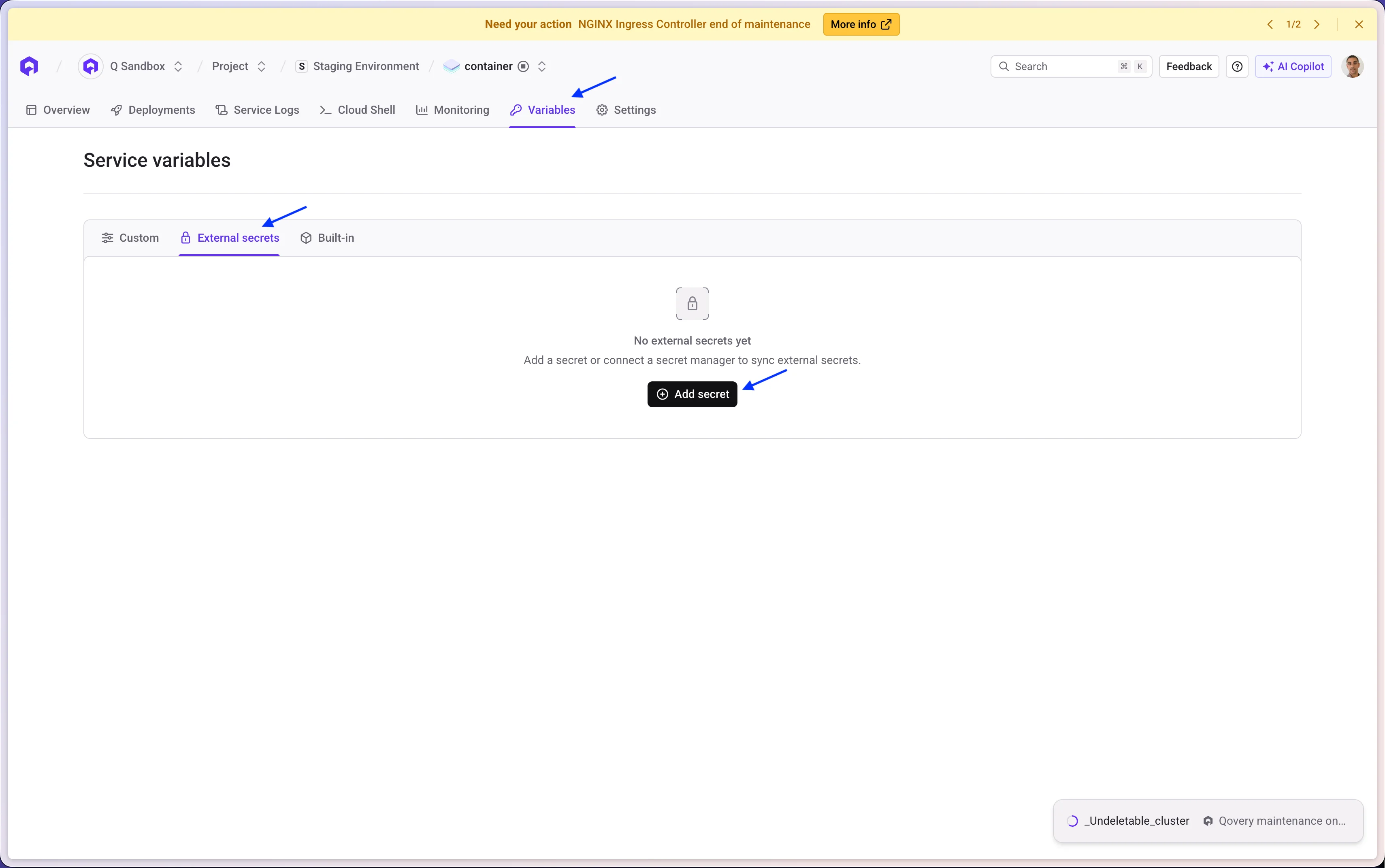 Qovery automatically lists the secrets available in your Secrets Provider to simplify setup:
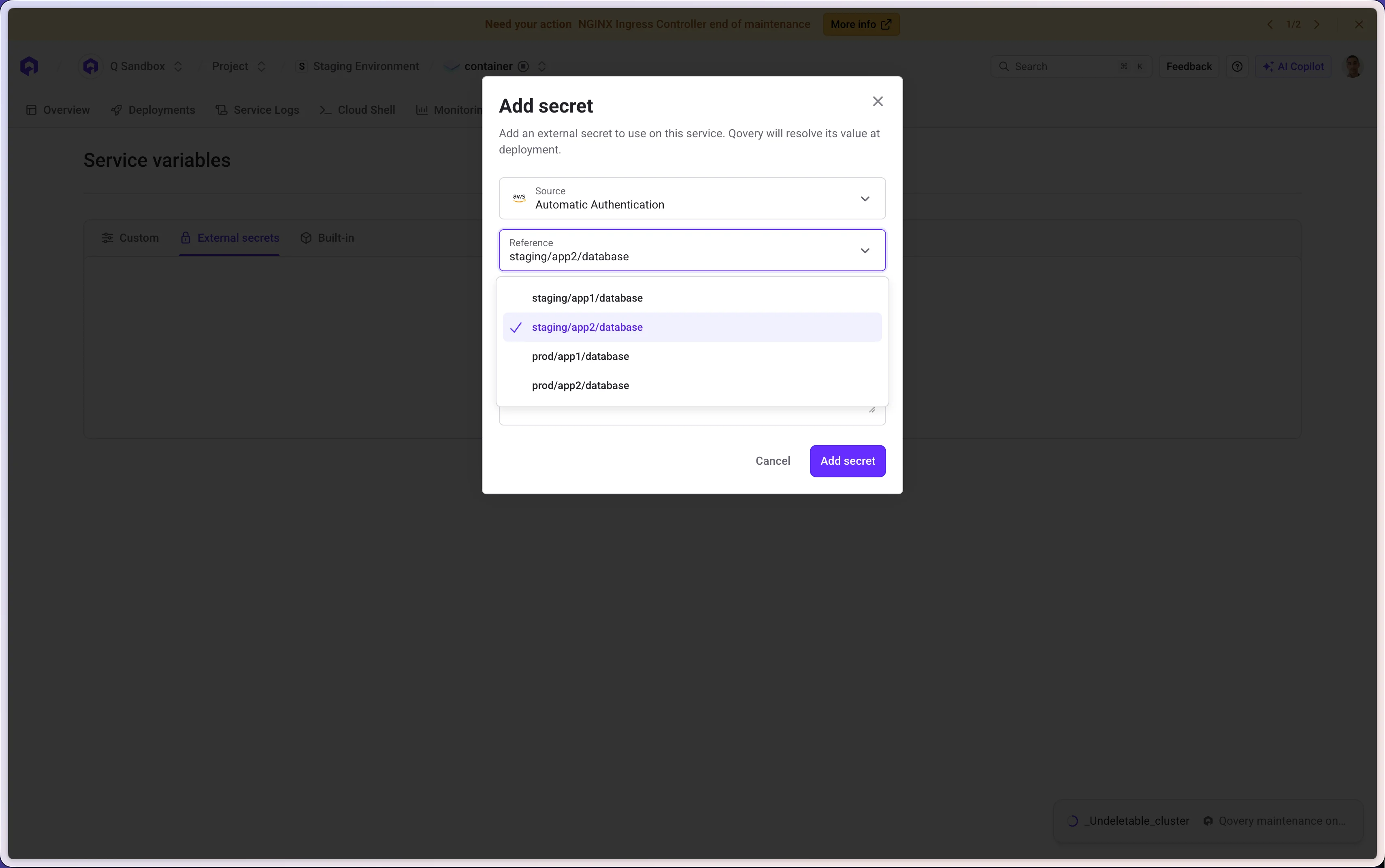 You can filter results **by prefix** to narrow the list:
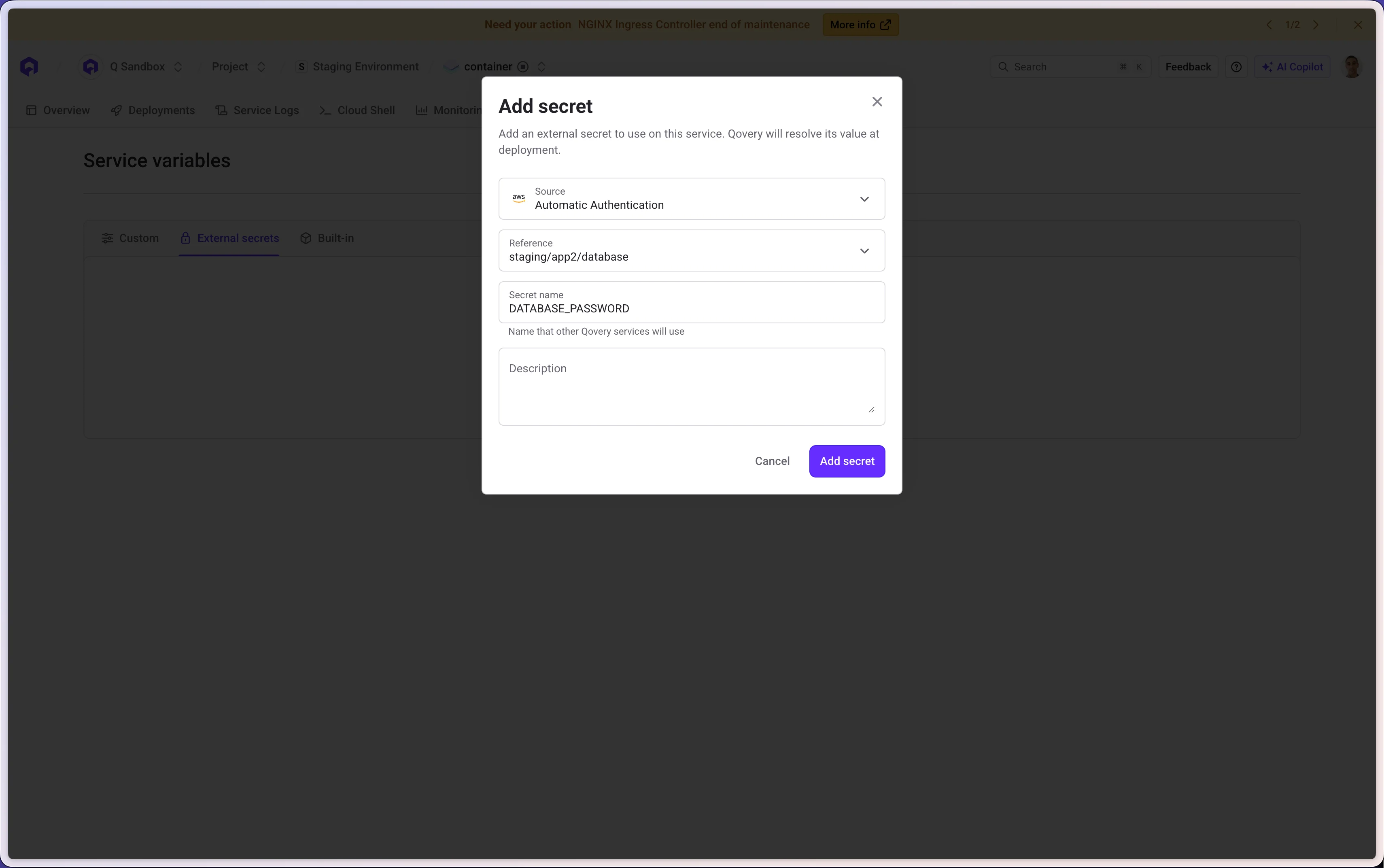
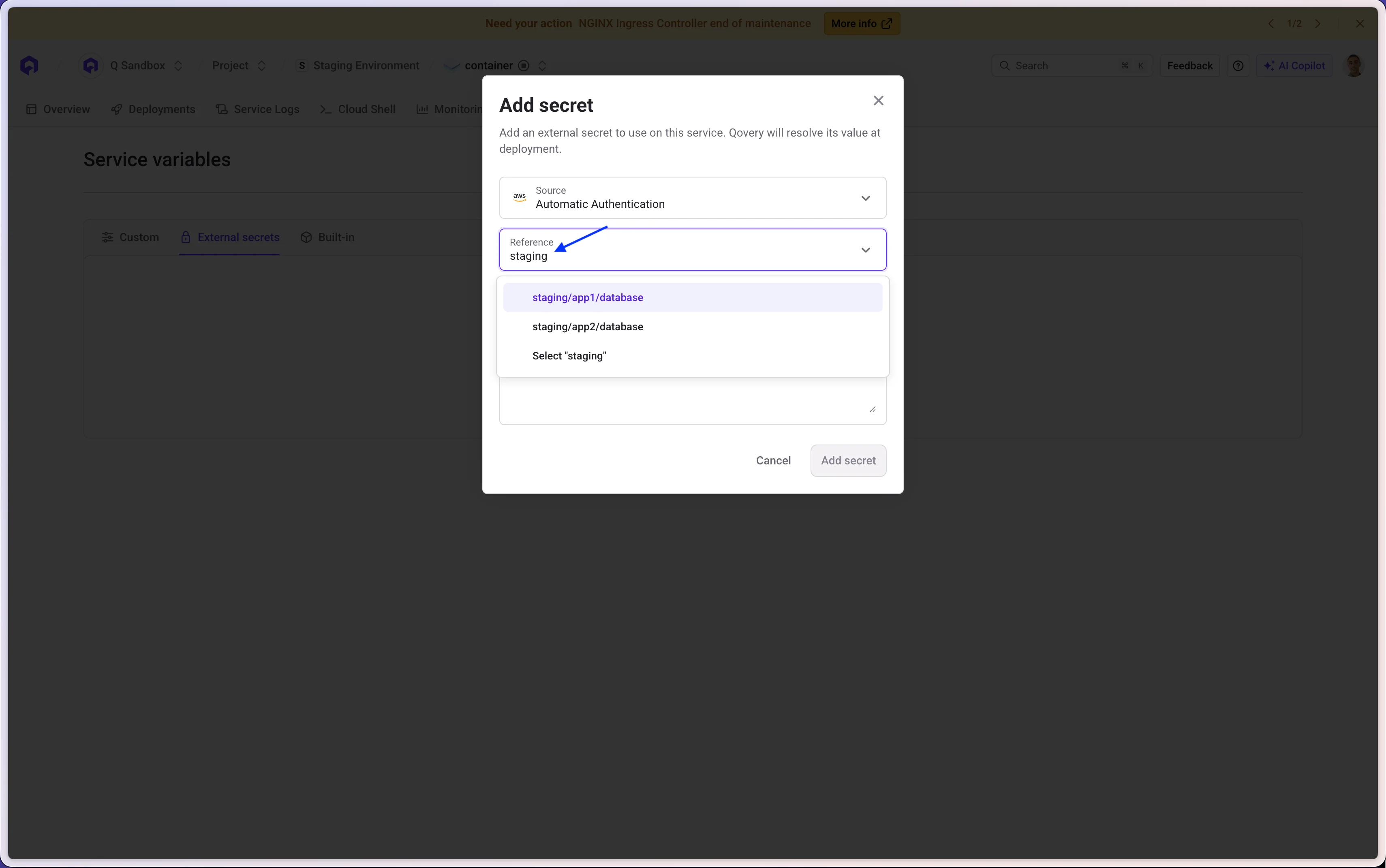 To create an external secret, you need to:
* Select the Secret Manager Access
* Select the secret from your Secret Manager
* Provide the environment variable key to inject
To create an external secret, you need to:
* Select the Secret Manager Access
* Select the secret from your Secret Manager
* Provide the environment variable key to inject
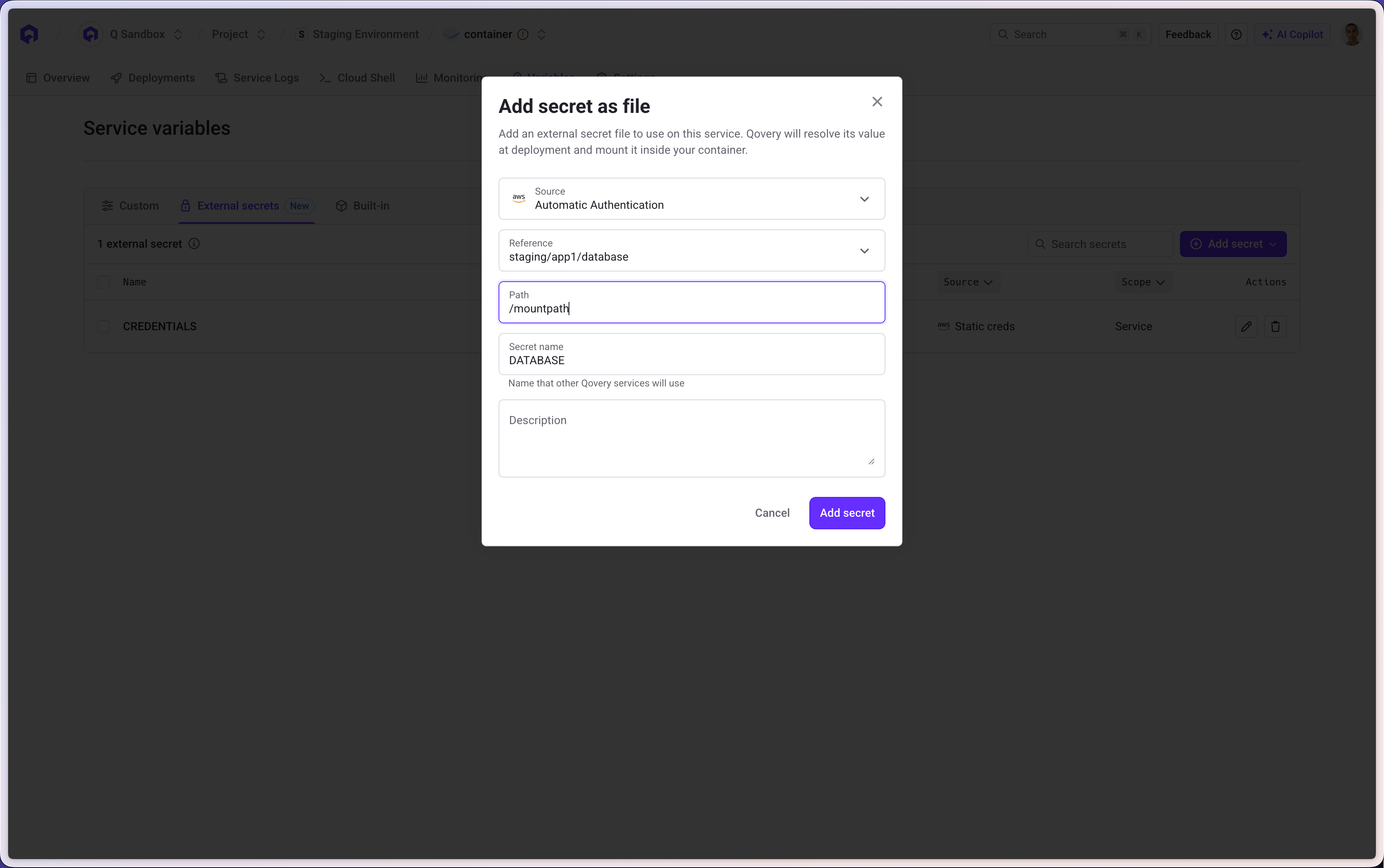
 Similarly to a basic environment variable, you can create an external secret that can be mounted to a file:
 External secrets are fetched **only at deployment**. A running service won't automatically pick up changes to its external secrets — it requires a redeploy.
### Using the Qovery CLI
* Create an external secret:
```bash theme={null}
qovery application external-secret create \
--project="My Project" \
--environment="My environment" \
--key="MY_EXTERNAL_SECRET" \
--reference="upstream/secret/name" \
--secret-manager-access-name="My Secret Manager Access"
```
To create an external secret as a file, just add the `--mount-path="path"` parameter
* Update an external secret:
```bash theme={null}
qovery application external-secret update \
--project="My Project" \
--environment="My environment" \
--key="MY_EXTERNAL_SECRET" \
--reference="upstream/secret/name" \
--secret-manager-access-name="My Secret Manager Access"
```
You can't update the mount path of an external secret (same behavior as basic environment variable)
* Delete an external secret:
```bash theme={null}
qovery application external-secret delete \
--project="My Project" \
--environment="My environment" \
--key="MY_EXTERNAL_SECRET"
```
### Using external secrets with Terraform services
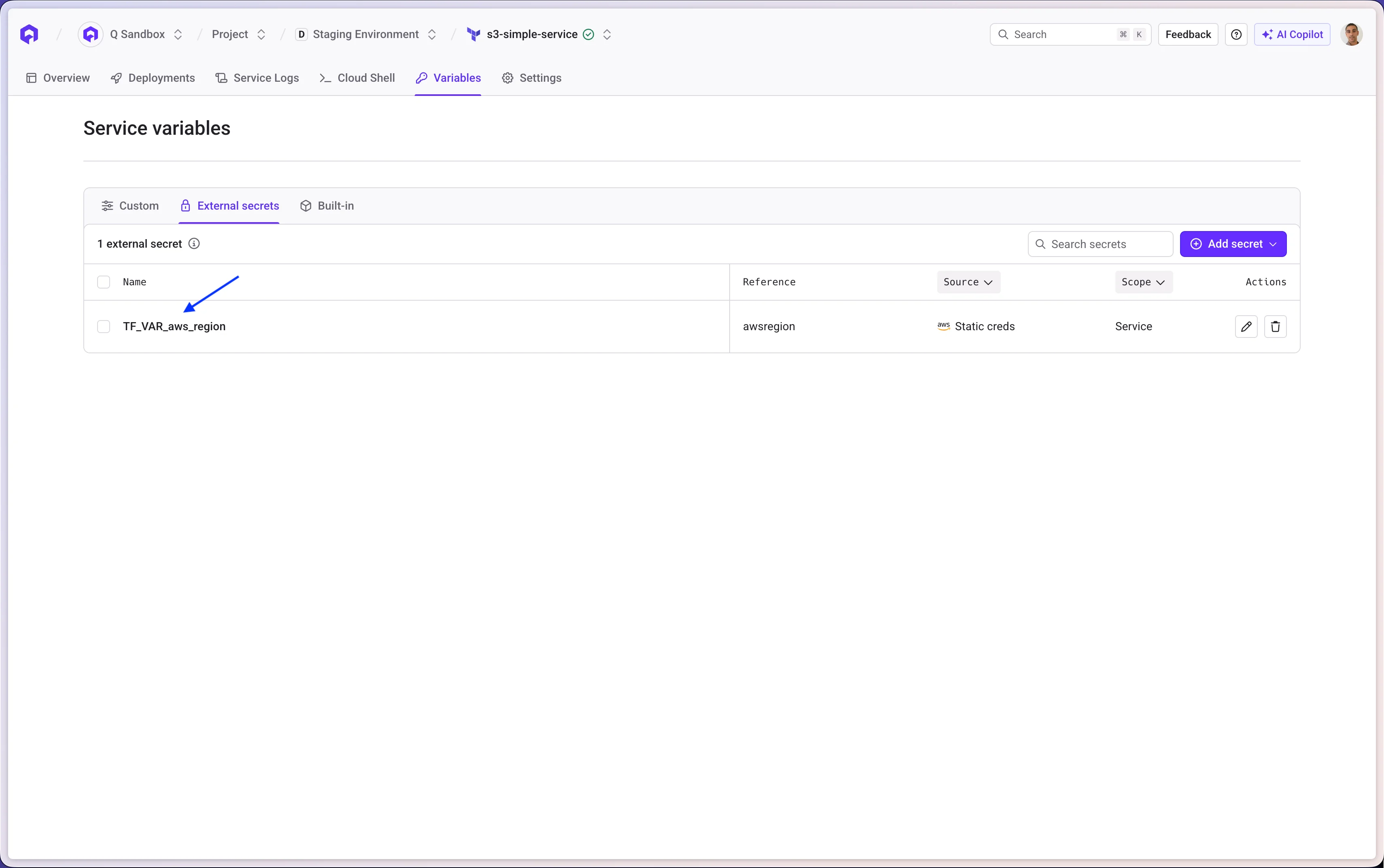
Terraform services handle environment variables differently from other service types. Unlike application services where any environment variable is directly injected into the container, Terraform services expose variables through the Terraform variable system (`TF_VAR_*`). This means external secrets require a specific naming convention to be picked up correctly by Terraform at runtime.
External secrets are supported only in the "External Secrets" tab:
* You can't reference an external secret inside the "Terraform variables" section
* You can't reference an external secret inside the "Terraform arguments" section
To inject external secrets into your Terraform workflows:
* The key of your external secrets must follow the pattern `TF_VAR_${your_variable}`
* You must not have an override of `your_variable` inside the "Terraform variables" from any `file.tfvars`
External secrets are fetched **only at deployment**. A running service won't automatically pick up changes to its external secrets — it requires a redeploy.
### Using the Qovery CLI
* Create an external secret:
```bash theme={null}
qovery application external-secret create \
--project="My Project" \
--environment="My environment" \
--key="MY_EXTERNAL_SECRET" \
--reference="upstream/secret/name" \
--secret-manager-access-name="My Secret Manager Access"
```
To create an external secret as a file, just add the `--mount-path="path"` parameter
* Update an external secret:
```bash theme={null}
qovery application external-secret update \
--project="My Project" \
--environment="My environment" \
--key="MY_EXTERNAL_SECRET" \
--reference="upstream/secret/name" \
--secret-manager-access-name="My Secret Manager Access"
```
You can't update the mount path of an external secret (same behavior as basic environment variable)
* Delete an external secret:
```bash theme={null}
qovery application external-secret delete \
--project="My Project" \
--environment="My environment" \
--key="MY_EXTERNAL_SECRET"
```
### Using external secrets with Terraform services
Terraform services handle environment variables differently from other service types. Unlike application services where any environment variable is directly injected into the container, Terraform services expose variables through the Terraform variable system (`TF_VAR_*`). This means external secrets require a specific naming convention to be picked up correctly by Terraform at runtime.
External secrets are supported only in the "External Secrets" tab:
* You can't reference an external secret inside the "Terraform variables" section
* You can't reference an external secret inside the "Terraform arguments" section
To inject external secrets into your Terraform workflows:
* The key of your external secrets must follow the pattern `TF_VAR_${your_variable}`
* You must not have an override of `your_variable` inside the "Terraform variables" from any `file.tfvars`